You set the rules. Beauta helps handle the rest.
Configure payments, staff selection, cancellation notice periods and rescheduling rules to match the way your salon works. Customers see exactly what they need to see while you stay in control.
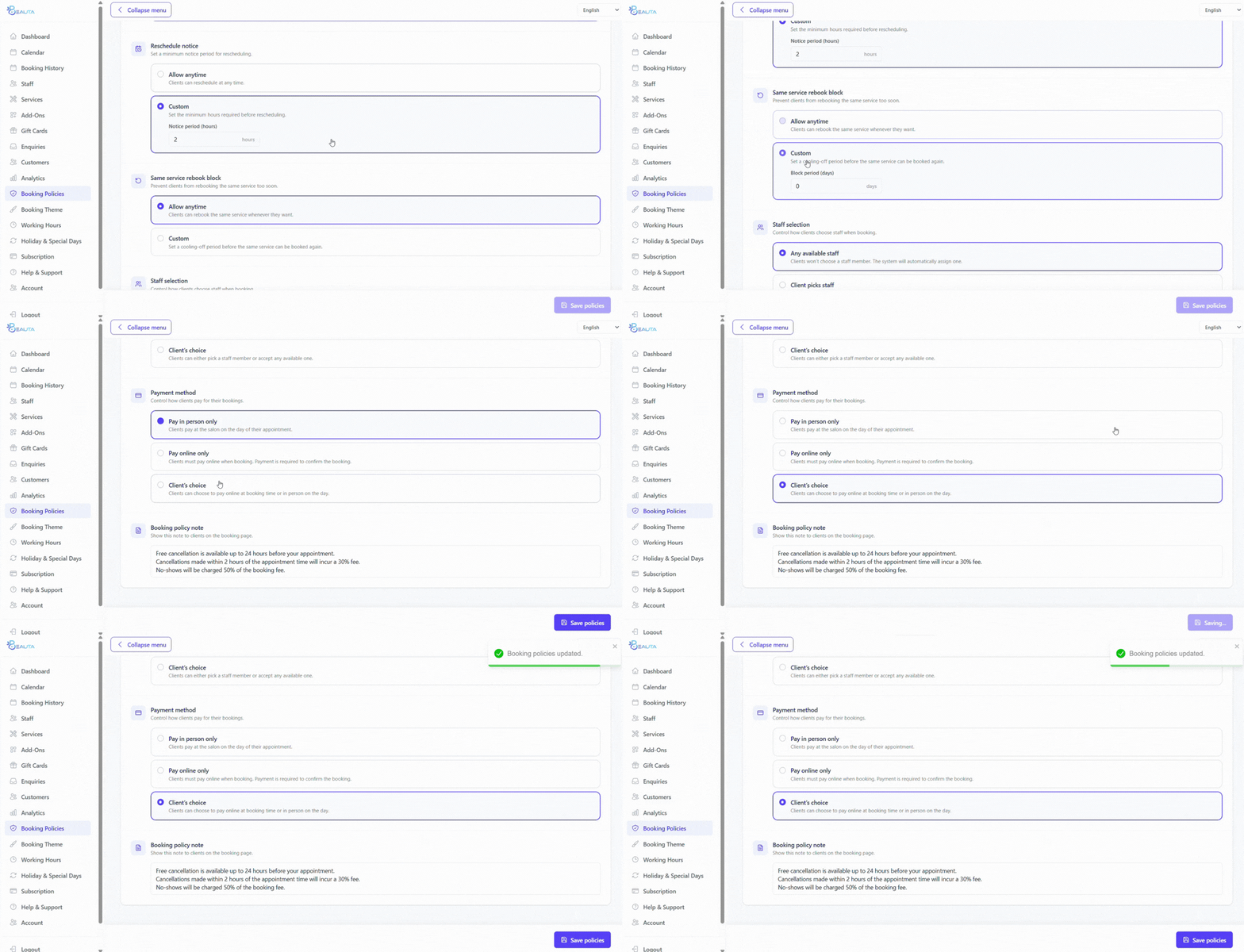
Payments
Online payments, in-salon payments, or both.
Set up payment flows that match the way your salon operates.
Pay in salon
Customers book ahead and pay when they arrive. Great for regular clients or walk-in focused salons.
Online payments
Customers pay online when booking to help reduce no-shows and secure appointments for high-value services.
- Default
Flexible combinations
Use different payment setups for different services. For example, longer appointments may require payment upfront while shorter services can be paid later.
Staff selection
Let customers choose, or let the salon decide.
Every salon works differently — Beauta supports both customer-selected staff and automatic staff assignment.
Customer chooses
Customers can choose their preferred stylist or therapist during booking.
Auto-assign
Beauta automatically assigns staff based on availability and scheduling.
- Default
Use both
Customers can choose if they want to, otherwise Beauta automatically assigns a suitable staff member.
Cancellations & rescheduling
Set notice periods your way.
Configure how much notice customers need to give before cancelling or rescheduling appointments.
- Different cancellation notice periods per service (24h, 48h...)
- Separate reschedule notice rules
- Mark late cancellations and no-shows in customer history
- Track repeat no-show customers
- Block selected customers from booking online if needed
Cancellation policy
Example · 24-hour notice
Additional settings
Every salon works differently.
Beauta supports different booking rules to fit the way your salon operates.
Limit repeat bookings
Limit customers from rebooking the same service within a certain timeframe to help avoid duplicate or unnecessary bookings.
Rules for customers, flexibility for admins.
Booking policies apply to online bookings, while admins can still manually create or adjust appointments when needed.
Booking Policy FAQs
Can I offer both online and in-salon payments?
Yes. Beauta supports online payments, in-salon payments, or a combination of both.
Can I require deposits for certain services?
Beauta currently supports both online and in-salon payments. Service-based deposits are a feature our team is currently developing.
Can customers choose their staff member?
Yes. You can allow customers to choose their preferred staff member or let Beauta assign one automatically.
Can I set different cancellation notice periods for different services?
Yes. Each service can have its own cancellation or reschedule notice period.
Does Beauta track no-show customers?
Yes. Beauta can mark no-shows in customer history and help block selected customers from booking online if needed.
Can admins override booking rules?
Yes. Admins can still manually create or adjust bookings when needed.
Keep exploring
More features to dive into.
Each feature compounds — see how the rest fit your salon.
- CalendarBookings, auto-assignment, drag-and-drop, color-coding, and a waitlist — all on one calendar.
- PaymentsOnline deposits, full payments, and gift cards — all powered by Stripe, end-to-end secure.
- StaffSet up your team once. Working hours, breaks, services, and pricing — calendar auto-syncs.
- Roles & AccessSeparate accounts per role. Limit pages and data each person sees. Only admins see everything.
- Reports & AnalyticsRevenue, bookings, top services, no-shows, YoY growth — plus AI forecasts coming soon.
- Feedback & IssuesCustomers rate their visit or report an issue with photos. Track every issue from open to resolved.
- Loyalty PointsCustomers earn points automatically on every completed visit and redeem them for discounts and rewards.
- Data Import & ExportExport bookings and customers in one click. Import data from spreadsheets, old systems, or any source with Beauta support.
Ready to set up booking policies for your salon?
Try Beauta free for 1 month and configure booking flows that match the way your salon operates.