One account for every staff member. Roles built around your salon.
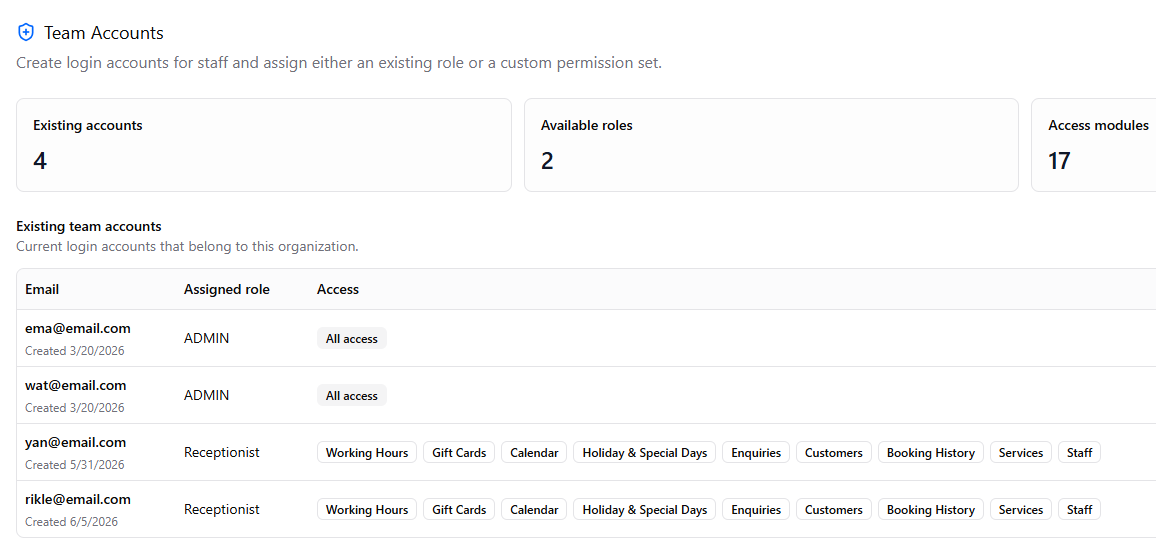
Beauta lets you create custom roles for admins, managers, receptionists and stylists with the right level of access for each person. Team members only see what they need to do their job.
Example setups
How salons usually organise access.
The roles below are just examples to help you get started. You can edit them, create new ones or build a completely different setup that fits your team.
- Full accessExample
Admin / Owner
Manage the entire salon including calendars, bookings, customers, reports, payouts, billing, settings and team management.
- Salon operationsExample
Manager
Handle day-to-day operations including schedules, bookings, customers, reports and staff calendars. Financial or billing access can be limited.
- Front deskExample
Receptionist
Create bookings, manage clients and check customers in. No access to revenue reports or sensitive settings.
- Personal workExample
Stylist / Staff
Only access their own schedules, bookings and customer information.
Flexible for your salon. Role names, access levels and permissions can all be updated anytime.
Keep salon information organised and accessible to the right people.
Beauta helps separate access by role so each staff member only sees what they need for their work.
Customer information control
Staff can be limited to only seeing customers and bookings related to them.
Restricted financial visibility
Revenue, payouts and billing information can be limited to admins or authorised managers.
Permissions by feature
Control who can access bookings, calendars, customers, reports and salon settings.
Quick access removal
Disable accounts, reset passwords or remove access when staff leave without affecting salon data.
Roles that fit your team.
Set up roles that match the way your salon operates.
- Create custom roles with your own names and permission sets
- Control access by page and feature
- Limit access by location for multi-location salons
- Reuse the same role across multiple staff members
- Easily update permissions as your team changes
- Bulk-assign roles when onboarding new staff
Roles & Permissions FAQs
Does Beauta include default roles?
Yes. Beauta comes with default roles like Admin so salons can get started quickly without complicated setup.
How many roles can I create?
Unlimited. Create as many roles as your salon needs.
Can I reuse the same role across multiple staff members?
Yes. A single role can be assigned to multiple staff members for easier and more consistent access management.
What happens when a staff member leaves?
You can instantly disable their account or revoke access while keeping booking history and salon records intact.
Keep exploring
More features to dive into.
Each feature compounds — see how the rest fit your salon.
- CalendarBookings, auto-assignment, drag-and-drop, color-coding, and a waitlist — all on one calendar.
- Booking PoliciesPayment, staff selection, cancellation notice — configure every rule the way your salon runs.
- PaymentsOnline deposits, full payments, and gift cards — all powered by Stripe, end-to-end secure.
- StaffSet up your team once. Working hours, breaks, services, and pricing — calendar auto-syncs.
- Reports & AnalyticsRevenue, bookings, top services, no-shows, YoY growth — plus AI forecasts coming soon.
- Feedback & IssuesCustomers rate their visit or report an issue with photos. Track every issue from open to resolved.
- Loyalty PointsCustomers earn points automatically on every completed visit and redeem them for discounts and rewards.
- Data Import & ExportExport bookings and customers in one click. Import data from spreadsheets, old systems, or any source with Beauta support.
Ready to set up access for your team?
Try Beauta free for 1 month and create the right level of access for every staff member in your salon.